
Provider Registry Implementation Guide
0.1.0 - ci-build

Provider Registry Implementation Guide
0.1.0 - ci-build
Provider Registry Implementation Guide - Local Development build (v0.1.0) built by the FHIR (HL7® FHIR® Standard) Build Tools. See the Directory of published versions
This is standard FHIR to create a new FHIR Resource. Users SHALL call this interface to create a Provider.
POST [base]/Practitioner
If the Provider Staff Category is known, a PractitionerRole will also need to be created, pointing back to the Practitioner Resource using the PractitionerRole.practitioner element. The LKPractitionerRoleStaffCategory profile is used for this purpose.
This is a deterministic search using an Identifier search token to find matching Practitioners. Users SHALL use this interface when searching for a Provider using an Identifier.
For example:
GET [base]/Practitioner?identifier=http://acme.org/practitioenr|2345
This Restful request is a standard FHIR search and will return a Bundle of Practitioners with zero or more entries. It is possible that more than a single Practitioner is returned and this may indicate a problem with Practitioner duplication or an error.
The PractitionerRole associated with that Practitioner can be returned using a _revinclude.
GET [base]/Practitioner?identifier=http://acme.org/practitioner|2345&_revinclude=PractitionerRole:practitioner
Consideration 🔎 Should only active Providers be returned? Should this depend on the role of the user? i.e. Administrators may want to see active and in-active Practitioners.
The vread interaction SHALL be supported for Resources.
GET [base]/Practitioner/123/_history/3
When searching for a Provider with search parameters the user SHALL call the following interface.
This query may return more than a single Practitioner. The more parameters used in the search the more likely a definitive single match is found. A list of FHIR R4 search parameters available for Practitioner queries is here. This set is reduced to the following:
Consideration 🔎 This is a proposed list, which will need to be refined during later design stages.
| Parameter |
|---|
| _id |
| active |
| gender |
| birthdate |
| family |
| given |
| telecom |
Consideration 🔎 Specific combinations of search parameters will reduce the number of matches, ideally to 1. For example, phone number with address and name will tend to give few matches. These preferred combinations should be specified in the future.
For example,
GET [base]/Practitioner?telecom=1231234&family=Perera&given=Lashith&gender=male
This is an element that defines the role of a Provider. In FHIR this is mapped to PractitionerRole.code. To accommodate staff category queries the following PractitionerRole query SHALL be supported
GET [base]/PractitionerRole?_include=Practitioner.practitioner&code=MD
or with chaining so, for example, the parameters above could be used
GET [base]/PractitionerRole?_include=Practitioner.practitioner&code=MD&pracitioner.active=true
Given that the Provider to update has already been found, this is a standard FHIR Restful update interaction. This function necessitates that PR users SHOULD search before using the Update interaction.
PUT [base]/Practitioner/123
Update as create - is not supported.
See the Facility design.
This association is indirect, as modeled in the Facility Design link above. One must create/find a HealthcareService first, then create the PractitionerRole and reference the HealthcareService. Since HealthcareService must have a Organization, the Practitioner is linked to an Organization through PractitionerRole and HealthcareService.
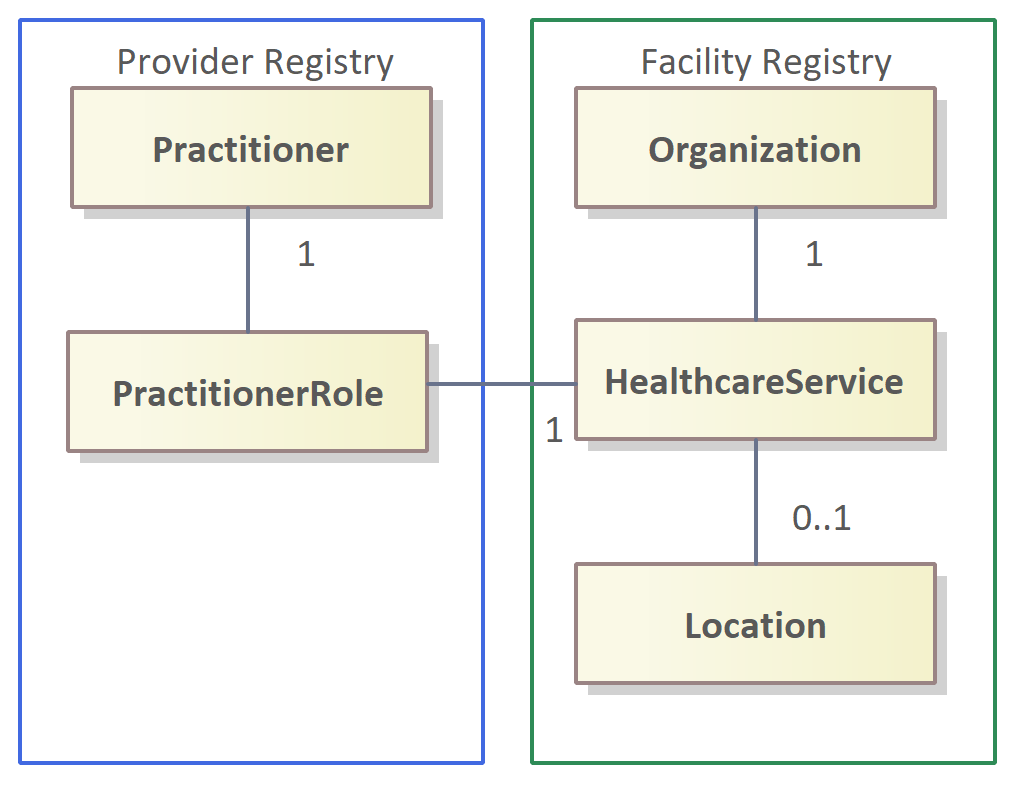
Note that the PractitionerRole created for this interface is not the same as the PractitionerRole used to contain the Provider Staff Category. The profile used for this purpose is LKPractitionerRoleServices.
See the Facility design.
This interface is as follows given the structure described in the Facility Registry guide and users SHALL call this interfaces when searching for Services by Provider:
First search the Provider Registry.
GET [base]/PractitionerRole?practitioner=Practitioner/123
As PractitionerRole for Services is limited a single Service, the query may return many PractitionerRole instances; search the Facility Registry for all the Services returned.
E.g. GET [base]/HealthcareService/123 for each Service